Saturday, January 23, 2010

Audio Journal? Exploring Mars Hill's Audio Journal

Something librarians love: reading. However, sometimes it is not safe to have one's nose in a book - while you are driving, or trying to clean-up. These are the times when audio books come to our rescue!

That is why we are excited to share with you Mars Hill's Audio Journals.

Rather than listening to hours upon hours of a book, this audio journal allows you to listen to smaller lectures, sermons, and presentations that are both enlightening and enjoyable.

On the latest edition, you can hear...

Jennifer Burns discussing the legacy of Ayn Rand.

Dallas Willard discussing spiritual knowledge.

And Christian Smith discussing the spiritual lives of people as they reach adulthood.

Please, come take a look... or a listen... to what the Mars Hill Audio Journals have to offer.

They are located in the Periodicals section, beside the Reference desk and can be checked out for a week.

Wednesday, January 13, 2010

News Flash: Computer Lab now open until 3:00am

As most of you, my Readers, already know, attached to Hurst Library is the Computer Lab where you can study late.

But things are about to get better... starting tonight, the Computer Lab will be open until 3:00am!

This is a handy spot to study while the rest of campus sleeps, with access to computers, the Internet, and printing.

See you there... well, actually, I'll leave the late night studying to you!

Sunday, November 8, 2009

Non-Book Related Services

Most of the time people come to the library to check out some books, use our reference materials, or search our databases; however, that is not all we can do for you!

Need a printer?
We have four (one in the lab, one upstairs and two in the print room), including a color printer!

Need a copier?
We have a black and white copier ($0.05/copy) and a color copier ($0.10/copy) - both print double-sided and both can copy a range of sizes.

Need a scanner?
We have two - both of our copiers scan to PDF documents that are automatically sent to your email for free.

Need a place for group study?
Reserve one of our two study rooms for group projects, tutoring, etc - just click here to sign-up.

Need to write a paper?
We have over 25 computers in the library with Word, Excel and PowerPoint. In addition, you can use our attached computer lab which is open until 1:30am every night!

Need a movie to kill some free time?
Here is a list of all our DVDs and VHSs that you can check out and enjoy.

So, as you can see, the library has a great collection of books, reference materials, and journal articles, but we can also help you with the nuts-and-bolts of college life too!

Wednesday, October 28, 2009

Need Sheet Music?

Northwest University is known for its excellent choirs and music program, so Hurst Library has and is continuing to acquire musical scores that you can check out.

We have everything from choral and vocal music, to operas and symphonies. The recent update to our website has made it easier than ever to locate these materials.

Here is how:

1) Log on to our website.
2) In the box near the bottom of the page, select "Browse by Format." There you will find a link
to all of our music, called "Print Music."

That is all it takes to find great items like...


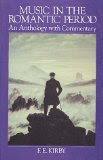
Music in the Romantic Period


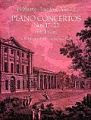
Mozart's Piano Concertos


If you still have any questions, please contact one of our helpful librarians - Christa, the Cataloging Supervisor for example, is a musician and would love to talk with you more about the collection.

Have an old score? Donate it! We accept donations and are very interested in expanding our Music collection!

Tuesday, October 27, 2009

Your Library Director is Famous

Yesterday the library staff received quite a shock when the newest volume of The Christian Librarian arrived in the mail...


That gentleman, circled in red in the center, is your Library Director, Charles Diede.

Every year we try to attend as many conferences, lectures, and seminars we can to stay on top of the changing world of library science. This way we can continue to bring you the most up-to-date information.

That is our promise to you.

Sometimes along the way we get famous, but most of the time we are just here to help!

Please stop by and congratulate Charles, and maybe ask us a few questions about your homework.

Sunday, October 4, 2009

New Website, part 3: Advanced Search

Welcome to the third installment of Website Navigation Help!

Previously we discussed how to use the Search Bar and explored the tools of our homepage.

Today, we are going to discuss the Advanced search options...

When to use Advanced Search?

Sometimes doing a keyword search does not pull up the records that you need to complete your work - either there are too many results, or the results don't have anything to do with what you want.

Let us begin by selecting the Advanced Search from the navigation bar at the top of our website.


This will take you to our entire advanced search screen.


As you will see, there are three different sections to this page - all three will be used for different reasons.

1) Finding Items Containing... This is where you go to limit or expand your search.


Between every word you type there is an imagined "and," "or," or "not" (depending on whether you are searching for all the words or none of the words). When you need to find a resource with more than one general topic, this is the place to go.

2) Exact Search...

If you want the computer to search only for the exact author, title, genera, etc, use the next set of search bars as demonstrated below.But be careful: even the slightest spelling mistake or misremembered pronoun will render the search null.

3) Limiting

Off to the right of the page is one of the most handy tools in your library arsenal!

You can choose which format you want your search results to be in - need a video? a journal? some music?
Or, do you want to search our Children's, Young Adult, or Reference sections only?


Take the time to explore all of these tools to limit your searching.
It is an easy, quick way to search like a librarian!


Sunday, September 27, 2009

Updates to Citation Guides

It is that time of year again when all of the major citation references publish updated versions of their style guides.

This year there were many changes! For example, MLA no longer assumes that the type of source is print - you must now label each citation as either "print" or "web." These changes might be a pain to learn, but they reflect the changing scope and method of research.

All of the new guides are available in the Reference section, in the general collection, and on the Reference Desk. Come and take a look.


Turabian (no new publication this year)


Need something a little quicker and simpler? You are in luck!

Your trusty Reference Librarian, Tru, and dedicated User Services Librarian, David, have updated the Quick Guides for all three (MLA, Turabian, and APA - click on the title for a direct link to the .pdf files).

Still cannot find the type of citation you are looking for? Come ask us or send us an email (library@northwestu.edu).

Remember, check out our Citation Help box on our Hurst Library Homepage if you have any questions!